Why Am I Not Getting Jobs on Upwork? The 5 Leaks to Check First
Most freelancers blame the algorithm. In 3,000+ jobs analyzed, the reason is almost always one of five leaks, and you can find yours with your own numbers in about 20 minutes.
Usually one of five leaks: you apply to jobs you cannot win, you apply too late, your profile does not back up your proposal, your opening talks about you instead of the client, or your bid does not match the job. Check your numbers after 50 proposals and fix the biggest drop first.
If you have been sending proposals for weeks and nothing comes back, it is tempting to blame the algorithm, the competition, or Upwork itself. Some of that is real. Upwork’s own Q3 2026 results showed 717,000 active clients, down 10% on the year, while each client spent more, $5,418 on average, up 8%. Fewer buyers, bigger budgets, more freelancers chasing each job.
But in the 3,000+ jobs I have analyzed and the 1,000+ profiles I have audited since 2022, the reason someone is not getting jobs on Upwork almost always sits in one of five places. This article shows you how to find yours with your own numbers, in about 20 minutes, and what to fix first.
First: do you have enough proposals to judge?
If you have sent fewer than 50 proposals, you do not have a problem yet. You have a warm-up. Under 50 proposals is not a diagnosis, because a handful of unlucky jobs can make any setup look broken.
Wait until you have 50 to 100 proposals before you trust a pattern. If you are below that, keep sending to well-chosen jobs (Leak 1 below) and come back to this checklist then.
Read your funnel before you change anything
Every proposal goes through four steps: sent, viewed, replied, hired. Where the numbers drop tells you which leak you have. Pull the numbers for your last 50 to 100 proposals from your Proposals page and proposal insights on Upwork, or from your own tracking sheet, then compare them with this table.
| Where it breaks | What it usually means | Check first |
|---|---|---|
| Few proposals viewed | The client never opened you. The job choice, the timing or the first two lines lost before the client clicked. | Leak 1, 2 and 4 |
| Viewed, but no reply | The client opened you, then opened your profile, and moved on. | Leak 3 and 5 |
| Replies, but no hire | The proposal works. The conversation, the rate or the follow-up loses it. | Leak 5, then your interview process |
| Few invites | Clients are not finding you in search. | Leak 3 (profile and keywords) |
Do not try to fix all five at once. Find the biggest drop, fix that one thing, then measure again.
Leak 1: you are applying to jobs you cannot win
The most common reason proposals are never viewed is the job choice, not the writing. If you apply to everything that loosely matches your skills, most of your Connects go to jobs where you were never a real fit.
Before you spend Connects, run every job through a short filter:
- The client is real. Payment verified, some hiring history, and a reasonable hire rate.
- The scope is clear. A one-line job post with no detail usually means a client who has not decided what they want.
- The budget fits your rate. A $50 budget for a job you would charge $500 for is not an opportunity.
- Your profile proves this exact skill. If the job asks for something your profile does not show, the client will notice when they open it.
- You are early enough to matter. More on that in Leak 2.
Connects are a budget, not confetti. At $0.15 each and about 14 Connects a bid on the accounts I manage, every proposal costs real money, so the job filter is where you save most of it.
Leak 2: you are applying too late
A good job can collect dozens of proposals within hours. Clients often start replying to the first strong applicants and stop reading long before they reach proposal number 40.
Here is one proposal from an account I managed. It went out 1 minute after the job was posted, it was the first proposal the client received, and it got a reply.
From my own data: “Lightning fast response! You were first to apply.” Response time: 1 minute. Status: Replied. One proposal, one account, so treat it as an example of the pattern, not a promise.
You do not need to sit on Upwork all day to be early. You need a system:
- Save 3 to 5 tight searches built around your niche keywords, not one broad search.
- Turn on job alerts for those searches so new posts reach you while they are fresh.
- Check at fixed times that match your clients’ working hours.
- Keep a proposal opening and proof points ready, so a strong proposal takes minutes, not an hour.
Leak 3: your profile does not back up your proposal
If clients view your proposal but do not reply, look at your profile before you rewrite another proposal. Clients open your profile right after reading your proposal, and they decide in seconds. If the profile says something different from the proposal, you lose them there.
Check these, logged out, the way a client sees you:
- Title: does it name the exact service the job asked for, in the words a client would search?
- First three lines of the overview: do they name who you help and the result, or do they start with “I am a hardworking professional with years of experience”?
- Portfolio: is the first project relevant to the job you just applied to?
- Rate and badges: do they match the size of jobs you are applying for?
The same profile problems also cut your invites, because Upwork search matches profiles to what clients type, so your title and skills matter there too. My free guide, The Upwork Visibility Ladder, walks you through 20 yes/no checks on your own profile.
Leak 4: your opening talks about you, not the client
The client sees the first two lines of your proposal before they decide to open it. If those two lines are your name, your years of experience or a greeting template, they look exactly like the other 40 proposals.
The proposal opening names the client’s problem, not your resume. Compare:
- Template: “Hello, I am a full-stack developer with 7 years of experience and I would love to help with your project.”
- Client first: “Your checkout drops users at the payment step on mobile. I fixed the same Stripe redirect issue for a Shopify store last month, here is how I would start.”
The second one uses the client’s own words from the job post, shows you read it, and gives a reason to keep reading. Then add one relevant proof point, a short plan, and one easy question to start a conversation.
Leak 5: your rate or bid does not match the job
A bid that does not fit the job tells the client something before they read a word. Too high for the budget and you are filtered out. Far too low and a serious client wonders why.
- Fixed price: start from the client’s posted budget and adjust to the real scope. Do not undercut by default.
- Hourly: bid inside the range the client posted, at the level your profile and proof support.
- Your floor: decide your minimum before you start applying, so you never bid below it in a hurry.
Underbidding rarely fixes a weak profile or a generic opening. It just makes each job you win worth less.
What about boosting?
Boosting buys position, not the click. A boosted proposal sits higher in the client’s list, but if the job is a poor fit or the opening is generic, it gets skipped from a better seat. Only boost jobs that already pass your filter, and track the reply rate of boosted proposals separately from organic ones before you decide it is worth the extra Connects.
What a healthy funnel looked like on one account
To make the numbers concrete, here is one client account I managed, over three months:
- View rate
- 45.93%
- Reply rate
- 21.11%
- Connects spent
- 3,519$527.85
- Connects per bid
- 14on average
- Cost per reply
- 62Connects ($9.30)
- Client acquisition cost
- $21.11
- Invites received
- 129
- Invites accepted
- 93
View the original screenshot
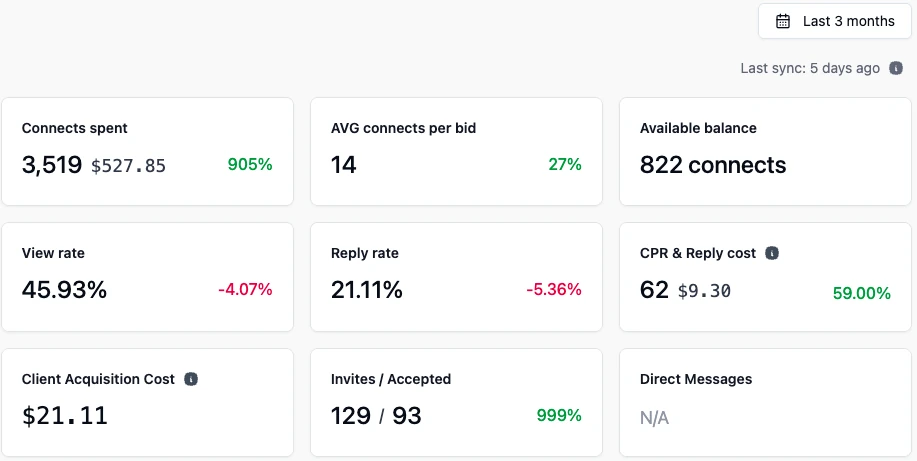
The same numbers, straight from the tracking dashboard. The small percentage on each tile compares with the previous period.
That is one account, in one niche, over one period. Your numbers will depend on your niche, profile, rate and timing, so use it as a reference for what to measure, not a target someone can promise you. The point is that every number above is something you can track for your own account.
Your 20-minute diagnosis checklist
- Count your proposals. Under 50? Keep going before you judge.
- Write down sent, viewed, replied and hired for your last 50 to 100 proposals.
- Find the biggest drop using the table above.
- Run your last 10 jobs through the Leak 1 filter. How many would you skip now?
- Check how long after posting you applied to those 10 jobs.
- Open your profile logged out and check the title, first three lines and first portfolio item against your last job.
- Read the first two lines of your last 5 proposals. Do they name the client’s problem?
- Compare your bids with the posted budgets.
- Pick the ONE leak with the biggest drop and fix only that for your next 30 to 50 proposals.
Frequently asked questions
How many proposals does it take to get a job on Upwork?
Nobody can give you an honest fixed number, because it depends on your niche, profile, rate and timing. What you can control is the quality of each proposal and how you choose jobs. Judge your results only after 50 to 100 proposals, not after 10.
Why are my Upwork proposals not being viewed?
Usually the job choice, the timing, or the first two lines. Clients see a short preview of each proposal and open the ones that look relevant and early. Apply sooner to better-fit jobs and open with the client’s problem, not your introduction.
Is it harder to get jobs on Upwork in 2026?
Partly. Upwork reported 717,000 active clients in Q3 2026, down 10% on the year, while spend per client rose 8%. There are fewer clients, but the ones who stay spend more, which rewards freelancers who look specialized and apply well.
Should I lower my rate to get my first Upwork job?
Not as a first move. A lower rate rarely fixes a profile that does not match the job or an opening that sounds like a template. Fix those first, set a minimum you will not go below, and bid inside the client’s posted range.
Do boosted proposals get more jobs on Upwork?
Boosting moves your proposal higher in the client’s list, but it does not make the client click or reply. Boost only jobs that pass your filter, and compare the reply rate of boosted and organic proposals before spending more Connects on it.
Want the bidding handled?
Managed Upwork bidding on fit-checked jobs, each proposal opening with the client's problem, with every number tracked.
See the bidding service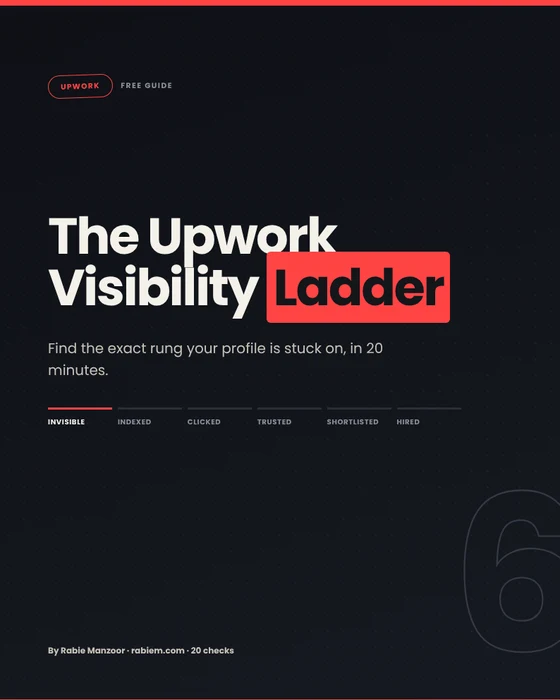

Rabie Manzoor
Upwork growth consultant and LinkedIn lead generation specialist. Top Rated Plus on Upwork with $200K+ earned and 282 jobs delivered since 2022. Software developer by training, so he treats client acquisition as an engineering problem: measure the funnel, find the leak, fix that one thing.